Requirements
This information is likely outdated. Contact and describe the live streaming features you need, to get recommendations for latest technologies available.
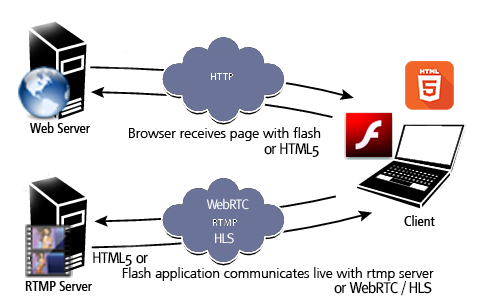 These high end features (web based live video streaming and interactions) have specific software and hardware requirements compared to a regular website.
This advanced software requires 2 types of hosting server capabilities (compulsory) usually on same server / host:
- a Web Server for the regular website features (HTTPS) and
- a Streaming Server relay for live video streaming (RTMP/HLS/WebRTC/RTSP)
This architecture makes it 100% web based and very easy to run for your website users, without software downloads and installations, on multiple device and browsers. Streaming technologies involved depends on each solution (specific requirements apply to each implementation depending on technologies used).
- HTML5 Live Streaming Server Requirements
- Wowza Streaming Engine (not cloud)- $2100/year licensing (check their site for current price), with special requirements:
- SSL (preferably StreamLock available with Wowza SE license) configured on streaming server
- Configuration for WebRTC, HLS, MPEG-DASH on streaming server
- FFMPEG with HTML5 codecs on web host
Warning: Standard web hosting servers and plans don't include the required specific live streaming server capabilities, server software licensing, tools and configurations or administrators experienced with such features.
- Using VPS, cloud instances for a live streaming server is not recommended for performance reasons and also does not make sense economically considering fixed server licensing costs and capacity limitations related to server streaming bitrate. Virtualized server environments may not be able to keep system clocks and live stream packets in perfect synchronization, causing issues like video & audio being out of sync or broken session recordings. A powerful dedicated server with high speed (1Gbps or bigger) internet connection is recommended to host the live streaming.
- Hosting Web & Streaming on Same or Different Physical Server
RTMP/HLS/WebRTC can be used remotely but many solutions also involve web scripts accessing files on rtmp server (like video files, streaming configuration) or additional requirements like FFMPEG for analyzing streams, generating snapshots, transcoding.
Recording, Archiving, VOD, Scheduled Playlists, Re-Streaming / IP Camera: When website scripts / integration requires access to video recordings/archives/streaming configs for management, conversion to HTML5 formats, both web and rtmp parts must be hosted on same physical server so web scripts have access to videos saved by streaming server. Streams from HTML5 WebRTC, re-streams, external encoders like OBS require FFMPEG with involved codecs to generate snapshots, analyze streams, transcode if necessary. Most web hosting providers do not provide such capabilites. If web hosting includes FFMPEG with necessary codecs, and other advanced features are not required, streaming can be done remotely.
Server Software (Hosting Requirements)
- HTTP Web Hosting
Recommended: CPanel based web hosting with suPHP enabled.
- HTTPS - recent browsers equire using HTTPS (and a SSL certificate) for enabling webcam publishing.
- PHP (The PHP implementation is simple so it can be migrated to other scripting languages like ASP or JSP).
Provided php sample scripts require these default php settings:- error_reporting = E_ALL & ~E_NOTICE & ~E_STRICT (on PHP 5.4+, 7+)
error_reporting = E_ALL & ~E_NOTICE (on PHP 5.3 or less) - short_open_tag On
- safe mode Off (if using older php, as function is deprecated in PHP 5.3 and removed in PHP 5.4)
- open_basedir restrictions should allow accessing CMS configuration and libraries (depending on integration)
- scripts require write permissions on certain files and folders (to store snapshots, chat logs, sessions) depending on edition
- error_reporting = E_ALL & ~E_NOTICE & ~E_STRICT (on PHP 5.4+, 7+)
- MySQL (not required for the php only stand alone simple integration, strict mode must be disabled)
- FFMPEG: (required only for video conversions and transcoding, with HTML5 HLS, WebRTC codecs including H264, NellyMoser, Speex, AAC, Opus).
- Document conversion tools (required only for setups that involve importing PDF, PPT, DOC, XLS, like Video Consultation slide import):
- Apache_OpenOffice
- ImageMagick
- unoconv
- Streaming Server Hosting
VideoWhisper rtmp application is developed and supported for these types of streaming servers: Wowza Streaming Engine
[recommended, for HTML5 and Flash apps]: RTMP, WebRTC, RTSP, HLS, MPEG-DASH
Wowza Streaming Engine
[recommended, for HTML5 and Flash apps]: RTMP, WebRTC, RTSP, HLS, MPEG-DASH
- recommended for recording/archiving (on same server with web scripts)
- recommended for heavy streaming volume and reliability
- compulsory and powering advanced features like
- WebRTC publish/playback ( requires configuring a SSL certificate) for HTML5 (inc. mobiles)
- HLS / MPEG DASH playback (also requires a SSL certificate HTTPS setup) for HTML5 (inc. mobiles)
- playlists scheduler (schedule videos as live stream channel)
- restreaming IP cameras or other streams
- RTMPS (also requires configuring a SSL certificate)
- HTTP Web and RTMP Streaming on same server: required for solutions that involve conversion of video archives, streaming of uploaded videos, scheduling playlists, restreaming IP cameras and similar advanced features that require both web and rtmp to have access to certain files.
- Clean Domain Nameservers
If you use a name server optimizer (ex. CloudFlare) certain protocols, ports and services may not work with default settings, including RTMP. You can use rtmp addresses based on IP to fix this or configure exceptions for RTMP (TCP port 1935).
Additionally, such services may alter output or force cache for scripts that communicate with chat and live streaming applications, which can break parameters and functionality.
Session Control requires streaming server to make requests to web server and these are disabled by default CloudFlare setup.
Other malfunctions from such services can occur in form of timeouts, restrictions on uploads, disabling certain requests or site features, showing site as offline when is online, showing outdated output or wrong formats for adaptive interfaces, extra latency on requests (including visible delays for interactions and chat).
Such services are designed for static content and often cause malfunctions for live content sites, when using default plans and settings.
VideoWhisper recommends against using such services that add an extra point of failure, extra latency and malfunctions for live content features.
- WebRTC - Some solutions implement streaming using WebRTC protocol for compatibility with HTML5 browsers that lack Flash plugin support. WebRTC streaming is done trough media server, as relay, for reliability and scalability needed for these solutions.
Conventional out-of-the-box WebRTC solutions require each client to establish and maintain separate connections with every other participant in a complicated network where the bandwidth load increases exponentially as each additional participant is added. Broadcasters need server grade connections to live stream to multiple users and using a regular home ADSL connection (that has has higher download and bigger upload) causes real issues. These solutions use the powerful streaming server as WebRTC node to overcome scalability and reliability limitations.
For most integrations that involve video recording and archiving, HTTP and RTMP must be hosted on same physical server so web scripts have access to the video files saved by rtmp server for management and conversion.
Server Power
The hardware configuration depends very much on the number of website members and visitors and also on website settings and target, so we cannot give you exact requirements.
The most important feature for video streaming is rtmp server connectivity.
We recommend servers with dedicated 100Mbps or 1000Mbps ports in well connected data centers (that have gigabyte connections with several providers).
A dedicated 100Mbps connection can host in theory a maximum of 200 streams at 512kbps each (for an average quality 320x240 video). High resolution streams require 1Mbps (360p) to 8 Mbps (Full HD).
Number of streams consumed for each user connected to server depends on communication logic. For 1 way broadcasts each user consumes 1 stream.
If there are 2 way private video chat rooms where each user sees 1 other video and transmits 1 video, 2 streams per user will be required.
If there are video conference rooms where each user transmits 1 video and sees other 3 videos, 4 streams per user will be required.
To host hundreds or thousands of streams simultaneously, servers with 1000Mbps connection and at least 8 Gb RAM are required (16-32Gb recommened if hosting both web and rtmp).
It's important to have the server in a reputable data center with high connectivity so all your users can connect to the server at good speed, from their different networks and providers.
For good performance and reliability average use should be maintained under 35-60% of maximum connection capacity.
In example a dedicated server with 1000Mbps connection should be allocated when 500 Mbps streaming is expected. Why that when theoretical connection is 1000Mbps? Because there's additional data used in addition to streaming, like other interactions, networking packets info, connection management traffic, often other services like web/mail/dns on same server.
To evaluate server and network capacity when choosing a server, consider monthly transfer available.
A provider selling servers with 10Tb/month is ready to handle around 30Mbps average transfer and if server allows only 5Tb/month your project should not require more than 15Mbps average transfer.
On high traffic events, servers could handle spikes up to double or more of this average bandwidth only if network load is low at that moment. Reliable services should be planned based on provider network capacity.
For transcoding, video conversion CPU is also important. A video card with good GPU can greatly increase video processing power.
VPS / Reseller / Cloud vs Dedicated Server
A VPS (Virtual Private Server) can be used for live video streaming project development and testing but is not recommended at production times.
Dedicated servers are recommended.
Virtualized server environments may not be able to keep system clocks and live stream packets in perfect synchronization, causing issues like video & audio being out of sync or broken session recordings.
Multiple VPS (Virtual Private Servers) share same server with same hardware (disk, CPU, memory, connection).
While resulting performance issues are not visible when serving http pages, frame loss/latency/temporary freezing can occur in live streams on a VPS, depending on how the other VPS on same server use the shared physical resources and temporary lock these.
When 4-12 VPS share same 100Mbps server connection, that can limit number of simultaneous users to 10-20. You should avoid using a VPS for production mode.
Altough it seems counter intuitive, a shared hosting plan on a server that runs a rtmp service can be better than a VPS because in the first case, the RTMP service (process) has full access to all dedicated server resources and distributes these to clients with designed streaming fluency.
On a VPS, the RTMP service is installed on a fraction of the server and resource allocation/balancing is done above the RTMP server. This can cause visible streaming interruptions, latency or server crashes due to throttling and resource cutting applied to rtmp service process.
We recommend using a RTMP service installed directly on a dedicated server, even if service is shared. We don't recommend a RTMP service installed on a server share.
Reseller accounts (setup with WHM/CPanel) are accounts that can manage multiple CPanel accounts. Multiple reseller accounts are usually hosted on a VPS or dedicated server and have less resources and priority than a VPS.
Usually reseller hosting providers don't include rtmp hosting due to management and resource allocation hassle.
Cloud instances are similar to VPS and have similar limitations (there are multiple instances on a server and each one can grow and occupy available free resources). Reference: AWS CDN Instance connection limit, EC2 Bandwidth Limit .
No Budget Hosting
Budget hosting usually means hundreds of sites or dozens of VPS / reseller accounts hosted on same server. That's how budget shared plans start from few dollars when a server costs hundreds per month and budget hosting companies still make profit.
All accounts on a server share same physical resources (disk, memory, CPU, connection) and often when others use the server there is latency or huge slow down because of resource bottle necks.
On regular http requests it's not an issue if host does not respond for 1-3s but for rtmp live streaming it's a big issue because of dropped frames and live latency.
Live video streaming and interactions it's a premium feature that usually requires a dedicated server.
Regular budget hosting does not provide rtmp because of high resource demands and also VPS often have performance issues (latency, frame loss) because of other clients locking the physical resources and causing stalls.
Also such service requires increased costs related to rtmp servers (administration and special licensing for certain rtmp server types).
Considering these, costs for live streaming hosting can be 10x higher than for budget hosting.
Client Software (User Requirements)
- Latest HTML5 based implementation require a HTML5 capable browser (most browsers, updated to latest versions). For mobiles iOS Safari, Android Chrome. Updated to latest versions.
- Decent internet connection (for streaming bandwidth requirements).
- Firewall settings (if a firewall is enabled): Clients need to be able to make connections over these ports:
- 1935 TCP = RTMP/E : RFlash Player and AIR clients make RTMP connections to a Streaming Server over port 1935 over TCP.
- 6970-10000 UDP = WebRTC streaming.
- 1936 TCP = Streaming Server sockets WSS, HTTPS HLS, MPEG-DASH and WebSockets (secured) on VideoWhisper s. Some setups may also use alternative 21936.
- 3478 UDP = WebRTC STUN/TURN discovery. Other: 5349 for TLS, 19305/19307 Google STUN server.
- 1935 UDP = RTMFP (obsolete): Flash Player and AIR clients make RTMFP connections to a Streaming Server over port 1935 over UDP.
- 19350-65535 UDP = RTMFP (obsolete): Clients connect to the server over 1935 and the server redirects the client to a port between 19350 and 65535. Allow inbound UDP traffic on 1935 and outbound traffic on ports 19350 - 65535. Not required if P2P is disabled (recommended for reliability). If you want to test P2P, check with RTMFP tester .
* Pricing and information referenced here may not be currently accurate and may change. You can check current prices and information directly on provider sites, order pages and test solution functionality in live demos with latest browsers.
Contact Now!Instant 100% web based video communications for your business. WELCOME TO THE NEXT LEVEL!
Copyrights VideoWhisper.com@2008-2024. All rights reserved.